|
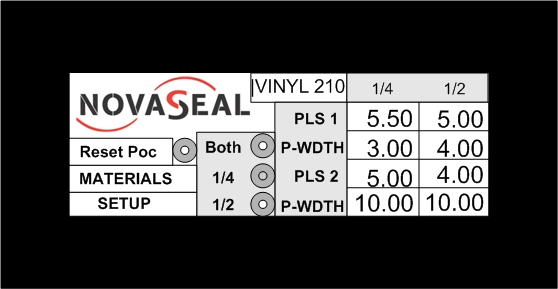
Main Menu. This screen allow you to access Materials index, Setup, and to Reset the Automatic PocketMaker. When the Main Menu looks like the example, above, click here to see what the Heat Sealing Control Section of the ShadeSealer-168 looks like.
To change sealing parameters, select MATERIALS.
To change seal width, select SETUP.
To turn on the Automatic PocketMaker, select SETUP.
To add parameters for a new material, select MATERIALS.
For contact information, select SETUP.
If the Automatic PocketMaker is ON and the Automatic PocketMaker indicator lamp is illuminated; and you desire to reset the Automatic PocketMaker, select Reset Poc. Touching the Reset Poc command will release the pre-folded pocket and allow you to restart Automatic PocketMaker process.
Additionally, this screen lets you see what the default material is, and what the sealing parameters are for this default material. In this example, “Vinyl 210” is the default material. This screen also shows you that the pre-selected sealing width is 1/4-inch. And furthermore, this screen would indicate that the Automatic PocketMaker is not on.
Please note that the Novaseal logo is black & white on the HMI screen. Select EXIT to return to the PLC/HMI Programming/Operations introduction.
|